Extracting Dominant Colours from Images and Displaying them in a Palette
As above.
Flask, NumPy, sklearn, SQL
I'd like to come back and make this application live, with an SQL databse and user login.
As above.
I'd like to come back and make this application live, with an SQL databse and user login.
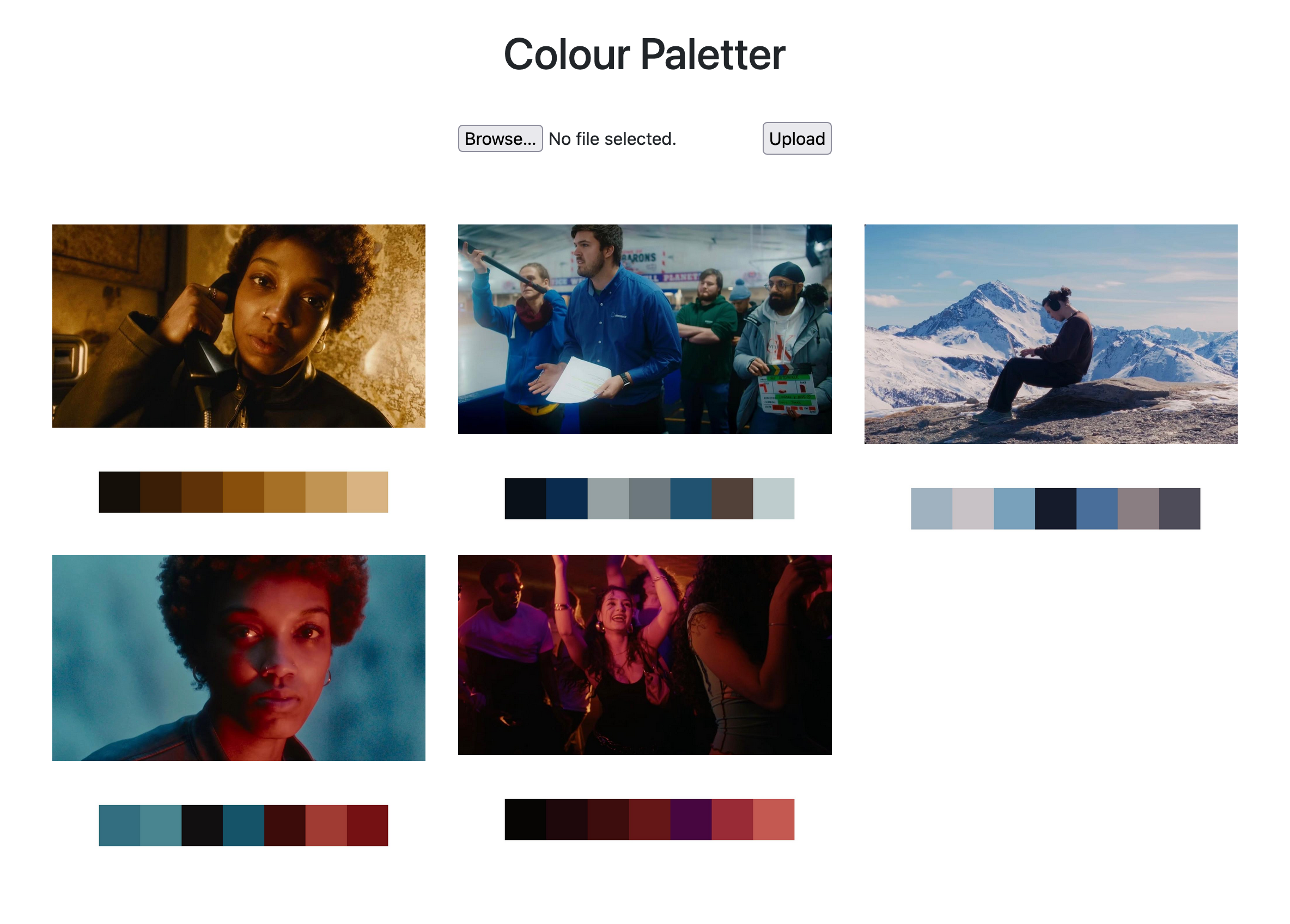
from flask import Flask, flash, request, redirect, url_for, send_from_directory, render_template
from flask_bootstrap import Bootstrap4
from werkzeug.utils import secure_filename
import numpy as np
from PIL import Image
import matplotlib.pyplot as plt
import os
from sklearn.cluster import KMeans


# Numpy bit to get colour info from image
def extract_colours(filename):
    img = Image.open(f"./static/images/temp/" + filename)
    img_array = np.array(img)
    num_colours = 7
    pixels = img_array.reshape(-1, 3)
    kmeans = KMeans(n_clusters=num_colours, random_state=0).fit(pixels)
    centers = kmeans.cluster_centers_.astype(int)
    labels = kmeans.labels_
    counts = np.bincount(labels)
    sorted_idx = np.argsort(-counts)
    dominant_colours = centers[sorted_idx]

    for i, (col, count) in enumerate(zip(dominant_colours, counts[sorted_idx])):
        print(f"{i+1}. RGB: {col.tolist()}, pixels: {count}")

    palette = np.zeros((50, 50 * num_colours, 3), dtype=np.uint8)
    for i, col in enumerate(dominant_colours):
        palette[:, i*50:(i+1)*50] = col

    plt.figure(figsize=(8, 2))
    plt.imshow(palette)
    plt.axis("off")
    plt.savefig(f'./static/images/outputs/'+filename, dpi=250)
    # plt.show()

# Define a function for opening images or allow image links for now
UPLOAD_FOLDER = './static/images/temp'
OUTPUT_FOLDER = './static/images/outputs'
ALLOWED_EXTENSIONS = {'txt', 'pdf', 'png', 'jpg', 'jpeg', 'gif'}

app = Flask(__name__)
bootstrap = Bootstrap4(app)
app.config['UPLOAD_FOLDER'] = UPLOAD_FOLDER
app.config['OUTPUT_FOLDER'] = OUTPUT_FOLDER

def allowed_file(filename):
    return '.' in filename and \
           filename.rsplit('.', 1)[1].lower() in ALLOWED_EXTENSIONS

@app.route('/', methods=['GET', 'POST'])
def upload_file():
    if request.method == 'POST':
        # check if the post request has the file part
        if 'file' not in request.files:
            flash('No file part')
            return redirect(request.url)
        file = request.files['file']
        # If the user does not select a file, the browser submits an
        # empty file without a filename.
        if file.filename == '':
            flash('No selected file')
            return redirect(request.url)
        if file and allowed_file(file.filename):
            filename = secure_filename(file.filename)
            file.save(os.path.join(app.config['UPLOAD_FOLDER'], filename))
            extract_colours(filename)
            # return redirect(url_for('download_file', name=filename))
    return render_template('index.html', images = os.listdir(app.config['UPLOAD_FOLDER']))

if __name__ == '__main__':
    app.run(debug=True)
<!DOCTYPE html>
<html lang="en">
<head>
    <meta charset="UTF-8">
    <title>Colour Paletter</title>
    {{ bootstrap.load_css() }}
    <style>
    </style>
</head>
<body>
<h1 style="text-align: center" class="my-4">Colour Paletter</h1>
<form style="text-align: center" method="post" enctype="multipart/form-data" class="p-3">
    <input type="file" name="file">
    <input type="submit" value="Upload">
</form>
<div class="row row-cols-xl-4 row-cols-lg-3 row-cols-md-2 row-cols-1 g-4 p-5" style="vertical-align: center">
    {% for image in images %}
    <div class="col d-flex flex-column align-content-center">
        <img src="static/images/temp/{{ image }}" class="image mb-3" style="width: 100%" alt="image"/>
        <img src="static/images/outputs/{{ image }}" class="image" style="width: 100%" alt="image"/>
    </div>
    {% endfor %}
</div>

</body>
</html>